


Statutory Warranty
Most frequently asked
-
In our Dealer Locator you will find certified FAZUA specialist dealers who can support you with a service case and other requests.
-
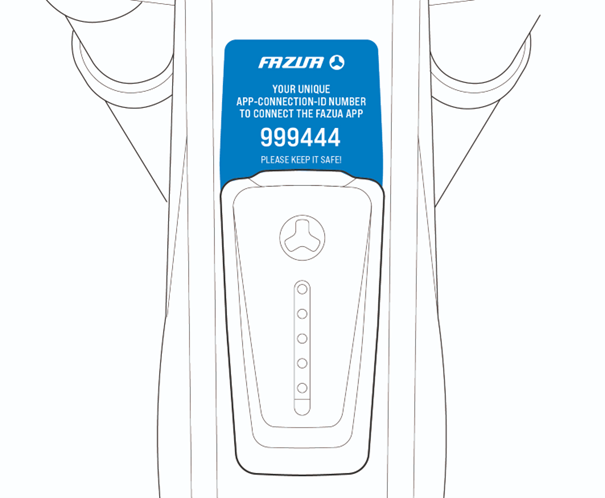
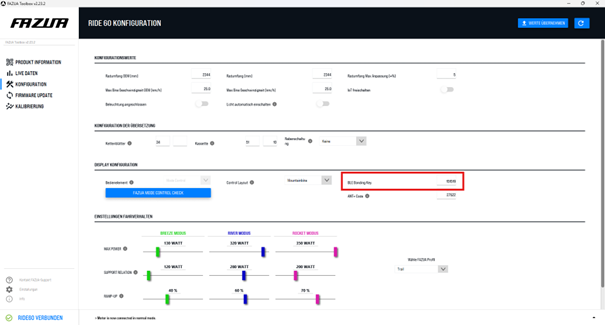
The Bluetooth bonding code (also called key or PIN depending on the smartphone's operating system) is a security feature that is different for each bike. This ensures that only authorized persons can connect the FAZUA App to your bike. You can easily find it out in two different ways:
- On a new bike, a blue label is attached to the LED hub or to the cable to the control unit.
- Connect your bike to the Toolbox Software. There you can read the Bluetooth bonding code in the "Configuration" tab.
-
You can find detailed instructions here in our Help Center:
Ride 60: https://fazuawarranty.ctdi.eu/en/support/help-center/videos/how-to-fazua-ride-60-firmware-update/
Ride 50: https://fazuawarranty.ctdi.eu/en/support/help-center/videos/how-to-fazua-ride-50-firmware-update/
-
Regular calibration is important so that your system can provide reliable and predictable assistance. There are two different ways to do this, depending on the installed firmware:
- If Firmware Bundle 12 or higher is installed, calibration takes place automatically shortly after each system start. Three conditions must be met for this: you ride at least 18 km/h and pedal continuously for at least 8 seconds with a cadence higher than 50 revolutions per minute. These are conditions that should be met after a short time on virtually every ride. After that, the system calibrates itself automatically.
- If your bike still has Firmware Bundle 11 or lower installed and you have no way to update the firmware to the latest version, you must perform the calibration manually in the Toolbox. To do this, put your bike in a work stand so that the cranks and rear wheel can turn freely. Connect it to the Toolbox using a USB-C cable. Once connected, select the "Calibration" tab. There you will be guided through all the necessary steps. You can save yourself all these steps in the future if you update your firmware to Rider Bundle 12 or newer – it's best to do it right away!
During calibration, it is checked whether the torque sensor is still measuring accurately. If necessary, adjustments are made to restore measurement accuracy. This is so important because the torque sensor measures the power that you yourself put into the drive via the pedals. The more accurately and reliably this measurement works, the better the system can respond to your input. Over time, measurement results can be distorted by external influences such as impacts, which is why it is necessary to calibrate the torque sensor regularly.
-
Calibration is important so that your system can provide reliable and predictable assistance. It is recommended when the system assists irregularly or other irregularities in riding behavior occur.
Calibration of the Ride 50 system is only possible via the Toolbox Software. To do this, put your bike with the battery inserted in a work stand so that the cranks and rear wheel can turn freely. Connect it to the Toolbox using a USB cable. Once connected, select the "Calibration" tab. There you will be guided through all the necessary steps.
During calibration, it is checked whether the torque sensor is still measuring accurately. If necessary, adjustments are made to restore measurement accuracy. This is so important because the torque sensor measures the power that you yourself put into the drive via the pedals. The more accurately and reliably this measurement works, the better the system can respond to your input. Over time, measurement results can be distorted by external influences such as impacts, which is why it is necessary to calibrate the torque sensor regularly.
-
When creating the system report, all functions of the e-bike are checked and the data is saved. It is the basis of every service request. To create it, you need a USB-C cable and the Toolbox Software.
First, you need to connect the Toolbox Software to the e-bike using the USB-C cable. Once the connection is established, select the "Create system report" button in the "Product information" tab. After the process is complete, you can individually name and save the system report.
-
You can find all spare parts that you can install yourself in the FAZUA Shop. If you cannot find the spare part you need there, it is only available through our network of FAZUA Certified Partners and must also be installed by a FAZUA Certified Partner. This ensures that sensitive components are installed correctly and that you can enjoy them for a long time. Contact the store where you bought the bike, or find a shop near you in our Dealer Locator.
If you have a service case or need support from a specialist dealer, you can find a certified FAZUA partner here. If you would like to submit a warranty request yourself, you can start the process here.